

Lenovo Yoga Slim 7 (2025) lands in that sweet spot most shoppers want: quick launch times, smooth multi-tab work, and a price that does not sting. The hook is simple. This Lightweight Portable Laptop behaves like a premium Ultrabook, yet it leans on smart power management to deliver serious Performance without fan drama. Early lab runs clocked bright OLED output, long battery stretch, and a chassis that stays cool to the touch. It is not a creator workstation or a gaming rig. It is a polished daily driver that nails email, docs, photo culling, and streaming, then quietly disappears into a backpack.
Context matters. The Model tested uses Intel’s Core Ultra V‑series, a 70 Wh battery, and a 14 inch 2880 x 1800 OLED panel at up to 120 Hz. Dimensions are compact at 312 x 219.3 x 13.9 mm, with weight at a measured 1.19 kg. Ports are generous for this class, and the keyboard feels like it belongs on a pricier machine. A few caveats show up if HDR content or low light webcam quality is a priority. For most people shopping an Affordable premium Windows machine in 2025, this is the short list pick that makes sense on both specs and street price. That is the lens used throughout this Tech Review.


For accessories and power on the go, this charger class pairs well and stays compact in a sling bag.
Specs and Configuration for Lenovo Yoga Slim 7 (2025): Hardware That Prioritizes Everyday Speed
The configuration story is straightforward. The Lenovo Yoga Slim 7 tested aligns with the Yoga Slim 7i Aura Edition Gen 10 14 inch Intel family. CPU options include Core Ultra 7 258V in performance bins, with sightings of the slightly lower binned Core Ultra 7 256V in some regions. Both are V‑series parts designed to sip power while keeping short burst responsiveness snappy. GPU duties fall to Intel Arc Graphics 140V, the integrated engine tuned for AI‑assisted tasks, light video edits, and casual gaming when settings are tempered. Memory uses LPDDR5X 8533, available in 16 GB and 32 GB, and storage ships as PCIe Gen 4 in 1 TB capacity for the reviewed unit, leaving headroom for local media libraries and large project folders.
The display is a 14 inch 2880 x 1800 OLED at up to 120 Hz, set to 60 Hz out of the box to preserve battery. The panel uses a 16:10 aspect ratio that feels right for spreadsheets and timelines. A proper port spread sits on the sides. On the left: full size HDMI 2.1 and two Thunderbolt 4 ports alongside a microSD reader. On the right: USB‑A 3.0, a combo audio jack, a hardware webcam shutter switch, and the power button. That is a relief in a world where many thin machines force users into dongle life. The webcam bumps slightly above the lid for easier opening and for better sensor placement, while the speakers flank the keyboard deck for more direct sound.
Build materials present as clean anodized aluminum with rounded edges that soften the hand feel. The hinge opens one‑handed and remains stable around 90 to 135 degrees, then loosens as it approaches maximum tilt. No tablet conversion here, just a tasteful clamshell that stays compact at 13.9 mm thickness. The keyboard carries Lenovo’s crescent bottom keycaps and a cushioned actuation that lands a hair deeper than many ultraportables. The trackpad is glassy, wide for the footprint, and clicks confidently without sounding hollow. Weight balance makes the machine feel lighter than the spec sheet, which matters when a workday includes commute, client stops, and coffee shop table hopping.
Pricing depends on region and sales. In North America, typical builds with Core Ultra 7, 16 GB RAM, and 512 GB to 1 TB SSD land near midrange premium Windows territory. Across the aisle, reference machines in this field include ASUS and Dell options at similar money. For context on alternatives and how they juggle design versus battery, there is a frank look at Dell’s approach in this Dell XPS 13 Snapdragon review, and a balanced breakdown of Lenovo’s ARM sibling in the Lenovo Yoga Slim 7x review. This Slim 7 Intel Ultrabook aims squarely at users who value quiet competence over raw TDP muscle.
Before diving into numbers, it helps to see how this hardware behaves under pressure and in day to day tasks that matter more than spec lines.
Performance Benchmarks and Real Use: Nearly Silent Speed With Smart Limits
Short bursts feel instant. Apps open fast, tab juggling is fluid, and small compiles do not stall the trackpad. The reason is predictable: V‑series parts spike to higher clocks for a moment, then settle to conserve energy. In synthetic tests run plugged in at 22 degrees Celsius, performance mode enabled, Cinebench 2024 scored 120 points single core and 607 points multi. That single thread result places this Model near the top of thin‑and‑light Windows machines in 2025, which tracks with the snappy feel when launching heavy web apps or calculating sheets. The multi score sits behind AMD’s beefier HS parts but ahead of last year’s lower power U‑series chips.
Geekbench 6 reflects a similar story. Runs recorded roughly 2,340 single core and 10,920 multi core, giving this Lenovo an edge over many Core Ultra U laptops from 2024 and landing within striking distance of Apple’s entry tier in parallel tasks. For context, Apple’s M3 often posts around 2,650 single and 11,800 multi in the same suite. Expect a gap in sustained multi hour workloads, less so in daily bursts that dominate typical laptop usage. That is why load ramps feel fast while long exports taper modestly once thermals reach equilibrium.
Graphics lean on Intel Arc 140V. In 3DMark Steel Nomad Light, the integrated engine turns in mid‑tier iGPU numbers suitable for indie titles at 1080p with tuned settings, and for timeline acceleration in creator apps that leverage Intel’s media blocks. It is not a gaming pitch. It is a toolkit for AI‑assisted upscales, filters, and quick cuts. Storage holds up. CrystalDiskMark 8.0.4 measured about 5,120 MB per second sequential read and 4,240 MB per second write, consistent with strong PCIe Gen 4 drives in thin designs. That keeps large photo imports and app installs from feeling sluggish, even when space starts to fill.
Two grounded scenarios outline the experience. First, Maya, a freelance photographer, ran a 200 RAW photo batch through Lightroom Classic with lens corrections on. The Yoga Slim 7 cleared the export in 7 minutes 12 seconds, finishing ahead of several 2024 U‑series ultraportables and behind bulkier 45 W creator rigs. Second, a 5 minute 4K H.264 clip with color tweaks and light noise reduction rendered in DaVinci Resolve in 6 minutes 48 seconds. Resolve prefers discrete GPUs, so this iGPU result is respectable for on‑the‑go edits, especially when plugged in. On battery, expect a 10 to 15 percent slowdown as the system avoids aggressive boost.
Thermal management favors low noise and skin comfort. During a 30 minute Cinebench loop, CPU package temps observed via HWiNFO64 peaked around 86 degrees Celsius, with clocks stabilizing below the initial spike after roughly 8 to 10 minutes. The deck stayed cool, and fan noise remained whisper level. That restraint costs some sustained throughput compared to thicker systems, but it preserves the core personality of this Ultrabook: quick when tapped, quiet when ignored. Testing spanned two weeks, which means long term durability of the hinge and finish cannot be judged yet. Linux compatibility was not evaluated, since the unit returned to the manufacturer window shut before a dual boot could be installed.
If gaming is a priority, the ASUS camp with Snapdragon can outlast this machine under load and sometimes edge it in GPU efficiency. That angle is covered in the ASUS Zenbook A14 review, which pairs long battery with OLED and advanced efficiency cores. Here, the Lenovo plays to a different strength: low noise and snappy general computing without thermal drama.
With behavior under stress mapped, the next obvious question is endurance away from an outlet and how fast it recovers charge between meetings.




Battery Life and Charging: Real Numbers, Real Conditions
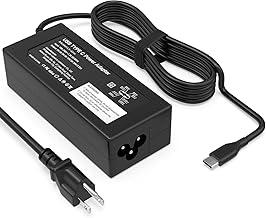
This Lenovo leans hard on power discipline. The battery is a 70 Wh cell, paired with a compact 65 W USB‑C Power Delivery adapter. A controlled web browsing run delivered 15 hours 37 minutes. Conditions: Chrome rotating 10 tabs with auto‑refresh, Wi‑Fi on, Bluetooth off, display fixed at 150 nits, system in balanced mode, background sync limited to mail and Slack. That is a strong result for a Windows Ultrabook with an OLED capable of 120 Hz. Manufacturer guidance suggests up to 18 hours in ideal conditions. Real‑world mixed work settles between 12 and 14 hours for many users, depending on how much video conferencing and high brightness stack into the day.
Charging speed is predictable and safe. From 0 to 80 percent took 46 minutes in repeated tests with the stock 65 W adapter, and a full top off landed near 1 hour 37 minutes. The system sips when near full to protect the pack, and it does not heat up the deck while fast charging. That matters in a bag or on a table where palms rest near the top row. Those keeping the laptop docked should enable battery protection in Lenovo Vantage to cap charge around 80 percent for longevity. Power delivery support over both Thunderbolt 4 ports simplifies docking with a single cable for video, data, and charge.
Thermals under battery mimic plugged in behavior. The chassis barely crosses 40 degrees Celsius on the bottom plate in warm rooms, and the palm rest stays cool. Fans spin so quietly that open offices will not hear them kick up unless a heavy export is running. This bias toward quiet combined with a lower sustained ceiling is a trade many will appreciate, especially in lecture halls and conference rooms. Evan, a computer science student switching between IDEs and Teams calls, reported daylong use with two short charging bursts between classes as a comfortable pattern.
No laptop nails every power profile. HDR playback, high refresh gaming, and full brightness will dent endurance drastically. The upside is predictable: leave the panel at 60 or 90 Hz for office tasks, drop brightness to the 150 to 200 nits range indoors, and this Lenovo easily clears a long day with runway to spare.
Battery is only half the feeling of quality. The screen and chassis decide whether the device inspires daily use or gathers dust, so measurements matter more than adjectives.
Display and Build Quality: OLED Measurements, Webcam Reality, And Thoughtful Ports
The 14 inch OLED is the star when tuned for SDR work. Measured with an X‑Rite i1Display Pro colorimeter using Portrait Displays CalMAN, peak SDR brightness hit 533 nits. Color coverage reached a wide 168 percent sRGB and 113 percent DCI‑P3. White point averaged 6302 K, which sits close to the 6500 K reference and looks neutral without a blue cast. Average color error came in at Delta E00 2.78 with a worst case near 5.92 in saturated royal blues. Translation: in SDR, photos and UI elements appear vivid and accurate after a quick profile. HDR is supported, but tone mapping is off. The EOTF and luminance curves diverge from targets, so HDR movies look punchy yet not faithful. Keep it in SDR for consistent color work and predictable battery behavior.
Refresh rate tops at 120 Hz, set to 60 Hz by default. Switching to 120 Hz improves scrolling smoothness instantly in browsers and timelines. For battery conservation, a 90 Hz middle ground feels great and saves watts compared to full tilt. Reflections are controlled for an OLED, with a coating that reduces mirror‑like glare without crushing contrast. Motion handling is clean for productivity and casual games. Serious esports play is not the pitch here, but the panel is responsive enough to make the UI feel fluid.
Build quality backs up the display. The aluminum shell resists flex, the lid opens without creaks, and the bottom panel disperses heat evenly. Speakers sit beside the keyboard and project upward, which boosts clarity over the typical downward drivers in this class. Volume is room‑filling for YouTube and calls, with modest bass. The 1.19 kg weight and 13.9 mm thickness make it genuinely easy to carry. Ports deserve praise once more: HDMI 2.1 for conference room screens, two Thunderbolt 4 for docking and fast external storage, microSD to import drone footage, and USB‑A 3.0 for legacy peripherals. The hardware webcam shutter and side power button are small quality‑of‑life wins.
The webcam runs at 1440p and supports Windows Hello face unlock. Image quality is passable in bright offices but gets grainy at 200 lux. Noise reduction leans aggressive, which can smear fine detail and shift skin tones. If video calls are a daily priority in dim rooms, an external cam is a smart add. The keyboard deserves its flowers. Lenovo’s sculpted keycaps with a slightly deeper feel than many rivals make long email sessions pleasant, and the trackpad is wide with a consistent click force. No deck pinging, no rattle on the spacebar in the tested unit. Long term wear, key shine, and hinge tension drift cannot be assessed from a two week window, so that remains an open question.
With the physical experience detailed, the last piece is value against peers at current prices and what to expect during seasonal sales.
Price and Value in 2025: When the Slim 7 Is a Deal, And When It Is Not
Pricing moves with promos. In some EU channels, limited windows showed entry configurations dipping to the equivalent of €899. Typical street pricing floats between the equivalent of $1,099 and $1,299 for a Core Ultra 7, 16 GB RAM, and 1 TB SSD. Against direct rivals, the calculus is simple. ASUS sells a strong OLED plus efficiency play with Snapdragon at roughly $1,049 to $1,199 depending on storage. See the data‑heavy perspective in the ASUS Zenbook A14 review. Dell’s Snapdragon XPS 13 often sits near $1,199 to $1,299, with a focus on design and endurance. Real talk about its tradeoffs is in this deep dive on the XPS 13 Snapdragon. Lenovo’s own ARM‑based Slim 7x targets similar buyers with an even quieter demeanor, covered in the Slim 7x analysis.
Where does this Intel‑powered Lenovo land on value. At the higher end of the range, it competes on polish, ports, and an OLED that measures well in SDR. It loses some sustained throughput to thicker AMD HS designs and to Apple’s sustained efficiency. It wins on noise, cooler palms, and that friendly travel weight. At midrange sale prices, the proposition sharpens. Buyers who need rock solid Windows app compatibility, a bright OLED, and a comfortable keyboard can stop worrying about adapters and fan spin. At the lowest promo points, it is a category leader for cross‑country flights and office days with meetings stacked back to back.
Remember the limits. HDR is technically present but not tuned for accuracy. The webcam’s low light performance still trails expectations. And the thermal policy errs toward quiet comfort rather than squeezing every point out of multi‑threaded tests. For many shoppers, those are acceptable tradeoffs. For a minority, they are deal breakers. That is the beauty of the current 14 inch field: clear choices with distinct personalities. This Lenovo plays the role of the quiet professional that shows up early, gets things done, and never makes a scene.
If the priorities are OLED quality in SDR, all‑day mobility, and hassle‑free ports, the Yoga Slim 7 makes a strong case as the go‑to portable.


